


SQL Reporting Services Plugin for WordPress
The Module Masters SQL Reporting Services plugin for WordPress brings our proven SSRS integration — the go-to solution for DotNetNuke since 2006 — to the WordPress platform. This plugin is the first of its kind, allowing you to embed Microsoft SQL Server Reporting Services reports directly within your WordPress site.
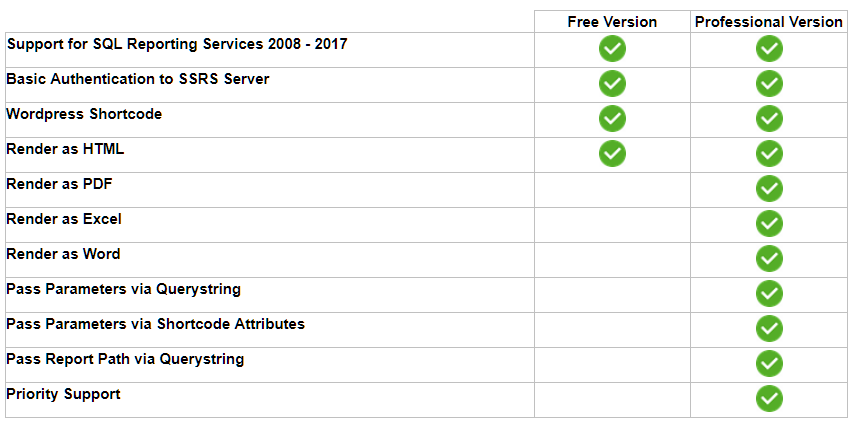
The plugin is available in a free version (GPL2 compliant, listed in the WordPress plugins directory) and a professional version with additional features. See the comparison chart below.
Free vs. Professional Version
Using the Plugin
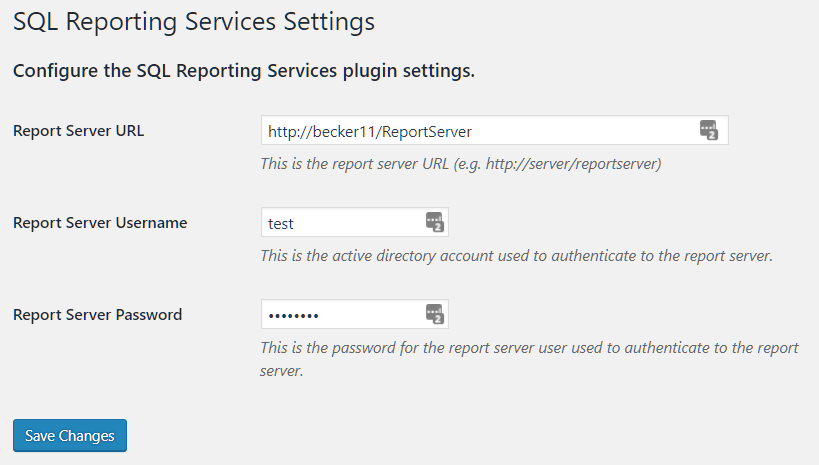
Once installed, the plugin is used as a shortcode within WordPress, giving you ultimate flexibility in where you embed SSRS reports. Setup takes just two steps:
Step 1 — Register the Report Server
Step 2 — Add a Shortcode
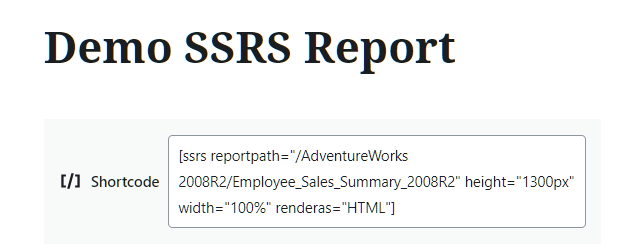
That's it — your SSRS report will render directly within your WordPress site. See the full documentation for a detailed overview of all available settings and shortcode parameters.
Feedback & Support
While this plugin is no longer actively supported, we'd still love to hear from you. Contact us at service@modulemasters.com for any questions. For the actively maintained DNN version, visit the SQL Reporting Services for DotNetNuke page.